
Drinking our own [insert favorite sweetened drink here].
We have a lot of content. Whitepapers, customer stories, product guides, analyst reports, webinars, data sheets. Years of material built for every stage of a buyer’s journey and every role in a modern data team.
And for a long time, most visitors saw roughly the same version of it.
Not because we didn’t care about personalization, but because doing it well is expensive. It is one thing to drop someone into a “marketer” bucket based on their job title and serve them a vaguely relevant CTA. It is another to respond to what they are actually doing on your site, right now, and surface the content that reflects where they are in their thinking. That second version has always been possible, but competing priorities and goals sometimes mean taking the time to do it right gets neglected. It always required more manual rule-writing, content tagging, and maintenance than most teams can sustain. So most teams settle for the demographic bucket with a promise to come back to it, and we were no different.
We’re a customer data platform company. If we weren’t going to figure this out on our own site, who would?
The problem we decided to tackle first
Static personalization has a ceiling. We could segment visitors by industry or persona and swap a few page elements. Useful, but blunt.
The gap showed up most clearly in the resource library.
Our resource library has grown into one of the most valuable assets on the site. Hundreds of pieces of content spanning use cases, verticals, and technical depth. But presenting it as a flat catalog meant every visitor faced the same wall of content and sorted through it themselves. The right piece for someone three visits deep into CDP architecture content is very different from the right piece for someone who just landed from a paid search ad for the first time.
We needed the library to respond to behavior, not just demographics.
What made this possible: consolidating the resource library
Before any personalization logic could work, we had to solve a content infrastructure problem.
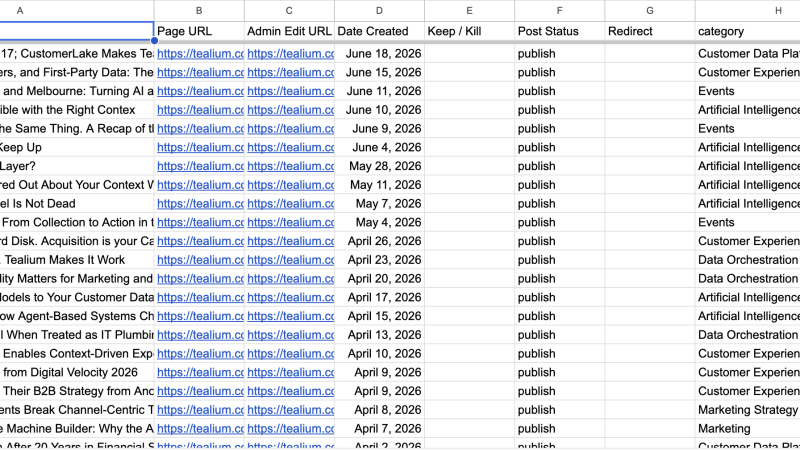
Our resources were in multiple formats and locations that made programmatic matching difficult. A recommendation engine cannot pick the right asset from a library it cannot read. We needed a single structured catalog with consistent metadata on every piece.
So we built a classifier and ran the library through it. It assigns two fields to every published piece of content: content_interest_area and content_depth. Interest area maps the piece to a subject, such as data collection, audience activation, or AI. Depth separates an introductory explainer from a technical architecture guide. Those two fields are what let the system tell the difference between a first-time visitor and someone three articles into a specific topic.
Both fields are published into the page data layer, which makes them available for analytics and for enriching visitor profiles in the CDP. That is what turned the resource library into something a personalization engine could query, rather than just an archive someone could browse.
How the personalization loop works
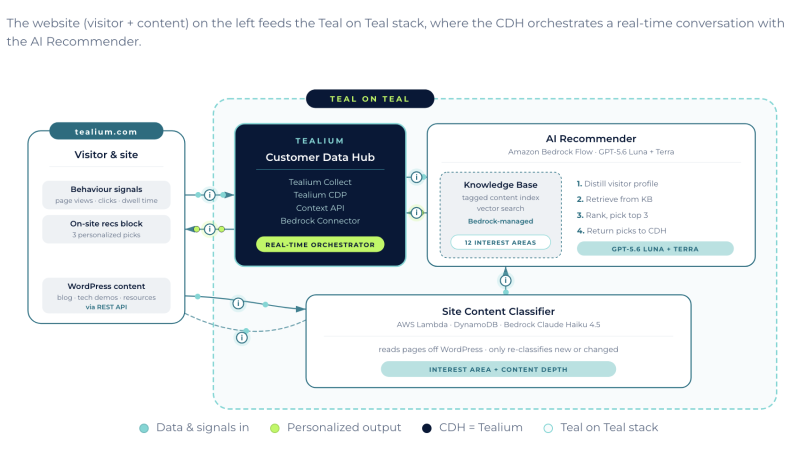
We used Data Collection, Tealium CDP, and Context API together to build a personalization layer driven by what visitors had actually done.
Capture. The data collection layer handles the data layer and tag orchestration. Every page visit, content interaction, and engagement signal gets captured through one governed layer, server-side and client-side. No fragmented tracking or inconsistent event schemas. The behavioral data flowing into the CDP is trustworthy because it starts from a single, well-structured source.
Profile. Tealium CDP assembles those signals into a visitor profile: pages visited, content categories engaged with, product areas explored, and depth of engagement both within a session and across sessions.
Recommend. The profile runs through a Bedrock Flow on AWS, which selects the three most relevant pieces of content and sends the recommendation back to Tealium CDP to be merged into the profile.
Serve. Context API delivers the recommendation to the page. The resource module on tealium.com now reflects that history. A visitor who has been reading about data collection and tag management sees different featured resources than a visitor exploring audience activation or AI use cases.
Then it repeats. New events enrich the profile, and the next recommendation is made against a better signal.
The closed loop looks like this: capture the behavior with Tealium iQ, build the profile in Tealium CDP, gather the recommendation from Bedrock and serve the experience with Context API. Repeat after a few events, with a richer signal.
What surprised us: how operational it is
Implementations like this have a reputation for being heavy. Custom personalization systems can become unwieldy fast, especially when logic lives in multiple places and no one team fully owns it.
But that was not our experience here, and the reason is that the logic sits in the CDP rather than in code.
The behavioral rules that determine who is eligible for a recommendation are configured inside the CDP by the team managing the site, not by engineering. When we want to change which content categories respond to which behavioral signals, or add a new resource to the rotation, we do it without writing code or waiting on a release. The rules are in one place, they are visible, and they are adjustable by the people closest to the content.
Measurement works the same way. Context API surfaces engagement metrics that make the loop observable: which content combinations perform, where visitors go after a personalized recommendation, and which signals most reliably predict deeper engagement. We can see what is working and tighten the rules accordingly.
What you should know before you try it
This took real work. We used our own products, with no special additions, but we also consolidated a content library, built and validated a classifier, and stood up a Flow in Amazon Bedrock.
While this isn’t straight out of the box, anyone can adapt this to their situation and implement it.
Getting the content in order took the bulk of the work. This whole system only works because everything upstream of the recommendation was cleaned up first. If your content is not consistently labeled, no recommendation engine will save you.
The dynamic blocks
The visible output of all of this is a set of dynamic blocks running across the site.
Each block is a three-across card layout that reads a visitor’s page visits, content interests, and engagement depth, then surfaces the content that matches their topic and their stage. For visitors we know less about, the blocks fall back to high-performing content and adapt in real time as the profile fills in. They follow the Tealium style system, so they look like the rest of the site rather than a bolted-on widget, and they carry their own tracking for impressions, clicks, and conversion impact.
This is not just a Tealium.com solution
Every company with a content strategy eventually hits the ceiling we hit. A growing library, a diverse audience, and a personalization layer that cannot keep up with human behavior.
The instinct is often to make more content. That rarely fixes it.
Most companies do not have a content volume problem. They have a structure problem. What was missing was a labeling that lets a system distinguish one asset from another, and the behavioral signal that says which one a visitor needs right now.
That part is now solvable.

Our new dynamic block as you can see below brings personalization directly into the website experience. Built in a clean, flexible three-across card layout, they use a visitor’s page visits, content interests, and engagement depth to surface the most relevant content for their topic and stage in the buying journey. For visitors we know less about, the blocks default to high-performing content; as we learn more, the experience can adapt in real-time.