Enrichment & Orchestration

Tealium Functions:
Run your logic
inside the data flow

A serverless JavaScript runtime inside the Tealium platform. Transform events in flight, call any API or model, and write results back for immediate activation.

A Serverless Runtime Inside Your Customer Data Layer

Tealium Functions is a serverless environment for writing and running JavaScript directly on the Tealium platform. Write a function, pick its trigger, and it executes against live events and visitor profiles. Tealium hosts, scales, and monitors it.

One Runtime. Three Points in the Data Flow.

Put your logic exactly where the data flow needs it.

Before Processing

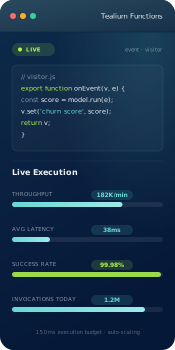
Data transformation functions modify, validate, or correct events as they arrive, inside a 150 millisecond execution budget.


After Processing 

Event and visitor functions fire the moment an event or profile is processed, with full access to the visitor object.

In the Activation Path 

Data record functions retrieve, augment, and deliver data inside cloud activation pipelines on the way to downstream systems.

What You Build With Functions

Customize Any of 1,300+ Integrations

Apply your own logic before activation to reshape payloads, meet partner-specific requirements, and keep every connector fitting your stack.

Build Integrations That Don't Exist

Send event or visitor data to any API-accessible system, without waiting on a vendor roadmap or an integration request.

Validate Events Before They Spread

Transform, standardize, and correct data at the point of collection so downstream systems receive events that already match their schemas.

Enrich Profiles From Systems Outside Tealium

Query loyalty platforms, inventory, fraud scores, or any external API in real time and write the answer back to the profile.

Protect Sensitive Data in Flight

Hash, encrypt, or obfuscate PII with crypto libraries built into the runtime before data reaches any destination.

Automate the Work Between Tools

Route events dynamically, filter test traffic, and run campaign operations logic in code instead of standing tickets.

What Teams Do First

01 Customize a Personalization Integration (Marketing)

Alaska Airlines wrote code in a day to send a broader set of events to its personalization tool.

02 Standardize Partner Payloads (Data & Analytics) 

Reshape events to each partner's spec before delivery, with no middleware layer to maintain in between.

03 Enrich Experiences With External Data (Marketing) 

Meridian Energy queries outside databases through third-party APIs to personalize web experiences with data beyond the CDP.

04 Hash and Obfuscate Regulated Data (Privacy & Compliance) 

Apply encryption or hashing before data leaves for any destination, so regulated attributes never travel in the clear.

05 Score Customers With Your Own Model (AI & Engineering) 

Invoke churn, propensity, or recommendation models where they live and activate the score in the same moment.

06 Route Debug Traffic Out of Production (Data & Analytics)

Filter test events into monitoring and logging workflows so production data stays clean.

Bring Your Own Model

A model creates value when its output reaches a live customer moment. Functions bridges the model you already built to the profile Tealium already maintains.

Call Any Model at the Moment of Inference

Invoke models in Snowflake, Databricks, SageMaker, BigQuery, or OpenAI with real-time event and visitor data.

Write Scores Back to the Profile

Model outputs land on the profile as first-class attributes, ready for segmentation, suppression, and activation in the same second.

Keep the Model Where You Built It

No replication, no new pipeline, no re-training migration. The model stays in your environment and Tealium brings it to life.

Custom Logic, Shipped

Customized an existing personalization integration in a single day, bringing in a broader set of events to improve the customer experience.

We were able to write some code in a day to customize the integration and bring in a broader set of events.

Joshua Benard

Product Manager, Alaska Airlines
Developed, tested, and stood up real-time external data enrichment in hours rather than weeks.

Meridian Energy

Why Teams Build Here Instead of Around the Platform

No Infrastructure to Run

No servers, queues, or deployment pipelines. Write the function in the platform and Tealium hosts, scales, and monitors it.

Logic Runs Where the Data Already Is

Functions execute in-stream against live events and profiles, so there is no export loop and no sync lag.

Live in Hours, Not Release Cycles

Customers stand up working use cases in a day or less, without waiting on Tealium's roadmap or their own backlog.

Governed Like the Rest of the Platform

Version history, publish workflows, logs, and per-function statistics keep custom code visible and auditable.

Questions Teams Ask Before They Build

Do we need JavaScript experts to use Functions?

No. Functions are small blocks of code, capped at roughly 1,500 lines, and most run far smaller. The built-in editor ships with templates, test invocations, and live logs, so a developer who writes basic JavaScript can ship one in an afternoon.

Is Functions a separate product we have to buy?

No. Functions is included with the Tealium platform.

What can a function connect to?

Any system you can reach over an API: internal services, partner endpoints, loyalty and inventory platforms, fraud systems, and model endpoints such as SageMaker, OpenAI, Snowflake, and Databricks.

How is this different from a connector or a webhook?

Connectors deliver data in a fixed shape. Functions add programmable logic around that delivery. Reshape the payload, validate it, enrich it, or send it somewhere no connector exists.

Can it handle enterprise event volume?

Yes. Transformation functions run up to 250,000 invocations per minute inside a 150 millisecond execution budget, and scaling is automatic.

How do we keep functions from becoming shadow code?

Every function lives in the platform with version history, publish workflows, logs, and per-function statistics. Your admins see exactly what runs, where, and how often.

Flexibility for your full stack

See how teams turn edge cases into production use cases with a few lines of JavaScript.

Get a Demo