


Overview
Tealium CDP (AudienceStream) allows for configuration enabling randomized persistent visitor segmentation for A/B or multivariate testing directly within the platform.
By leveraging the Split String enrichment, organizations can use Tealium to assign visitors into Test and Control groups at the Visitor level and ensure those assignments persist across sessions.
Because Tealium automatically maintains a visitor ID for each device or browser – and merges known IDs through visitor stitching – these test/control group assignments remain stable across both authenticated and anonymous states, allowing for clean measurement and consistent audience targeting.
This guide outlines how to configure Visitor Attributes, Enrichments, Audiences, and Measurement strategies for A/B testing within AudienceStream.
Contents:
- Prerequisites – Visitor Identity Resolution, Stitching, & Profiling
- Simplified Attribute Setup
- Split String Enrichment Configuration
- Audience Definitions & Activation
- Implementation Considerations & Best Practices
Step 1: Prerequisites – Visitor Identity Resolution, Stitching, & Profiling
- Before implementing A/B testing, ensure that visitor identification and data collection are properly configured in Tealium iQ Tags and AudienceStream CDP.
- Tealium automatically assigns a visitor ID for each browser or device.
https://docs.tealium.com/server-side/visitor-stitching/anonymous-user-visitor-id-attributes/#anonymous-id - When authenticated identifiers (e.g., hashed email or CRM ID) are captured, Tealium merges visitor profiles using Visitor Stitching, ensuring continuity across devices and channels.
https://docs.tealium.com/server-side/visitor-stitching/about/ - With these mechanisms in place, a visitor’s A/B test group assignment will persist across sessions and visits (and across devices if stitched), maintaining deterministic group membership.
Step 2: Simplified Attribute Setup
To enable a simple A/B test configuration, we start by creating the following Attributes within Tealium CDP:
| Attribute Name | Type / Scope | Description |
| AB Test Group | String / Visitor | Stores the randomized assignment value (e.g., “Control” or “Test”) created via Split String enrichment. |
| AB Test Name | String / Visitor | (Optional) Used to store the name or identifier of the active test or campaign for reporting and analysis. |
| Has Converted (Visit) | Boolean / Visit | Tracks whether the visitor completed the desired conversion action during the current session (e.g., purchase, form submission). |
These attributes provide us with a simple and easy-to-understand foundation for segmenting visitors into test and control audiences and measuring test performance.
As you extend the behavior of your Tealium CDP visitor profiles and run different types of A/B tests, you may choose to set up different Attribute configurations to track those.
Step 3: Split String Enrichment Configuration
The Split String enrichment allows you to assign visitors into groups based on a randomized distribution.
This enrichment is configured directly on the AB Test Group attribute and requires no source input or external randomization key. AudienceStream automatically handles randomization internally and assigns and persists the result at the Visitor level.
To configure:
- Create or edit the Visitor String Attribute AB Test Group.
- Add a Split String enrichment to the attribute.
- Keep the box checked Allow split to only occur once for given scope.
- Define the values and their distribution:
- Control → 75%
- Test → 25%
- Save and publish your AudienceStream configuration.
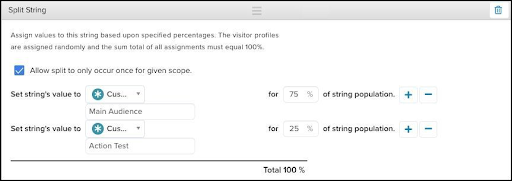
How it works:
- The Split String enrichment runs once per visitor when their profile is created.
- Each visitor is randomly assigned to one of the defined values based on the configured distribution.
- Once assigned, the value is stored permanently on the visitor profile and persists across visits and sessions (and across devices if stitched).
- Tealium CDP’s built-in randomization logic ensures even distribution of group assignments over time.
Key considerations:
- You do not need to specify a “source attribute” or seed — randomization is handled internally by Tealium CDP.
- The Split String enrichment will not overwrite an existing group assignment unless you explicitly create an enrichment that resets the attribute.
- Early Test/Control distributions may show minor variance, but balance will normalize as audience size increases.
Step 4: Audience Definitions & Activation
Define two audiences in Tealium CDP to represent the groups:
- A/B Test – Control → Criteria: AB Test Group equals “Control”
- A/B Test – Test → Criteria: AB Test Group equals “Test”
Use these audiences to drive different experience paths or tactics. For example:
- Pass the value of AB Test Group to personalization engines, analytics tracking, media platforms, or activations via connectors or tags (tags via mapping and Data Layer Enrichment – https://docs.tealium.com/server-side/attributes/data-layer-enrichment/about/).
- Ensure your activation mechanism references the same attribute to deliver the correct variant to each visitor.
- Because Tealium provides a stable visitor ID and assignment logic, we can maintain the same variant delivery for the same visitor across channels/sessions.
Step 5: Implementation Considerations & Best Practices
- Once you launch a variant test, avoid changing the enrichment logic (distribution or source test name attribute) mid-test — doing so may re-assign visitors or break consistency.
- Clearly document the test name (AB Test Name) attribute and timeframe so subsequent measurements align with the correct test version.
- If you’re using multi-variant or rolling tests, consider adding another attribute or combining test name + group attribute using a Set of Strings or Tally attribute for clarity.
- Maintain clean separation between test and control experiences in activation platforms to ensure there’s no cross-pollution (e.g., a “Control” visitor accidentally receiving the “Test” experience).
- Use the Trace tool and Visitor Profiler Sampler report within AudienceStream to verify that AB Test Group is correctly set and being passed to downstream systems (via connectors).
- After test completion, archive the logic and ensure the attribute value remains in the profile for analysis historically (do not reset immediately unless you’re launching a new test).
Summary
By using the Split String enrichment in Tealium CDP, you can assign visitors into randomized and stable test/control groups.
This approach helps you maintain group assignment across sessions and devices, feed the group values into activation channels, and measure the impact of test variants end-to-end.
Further reading: